
All Horse Guides
Buying Horses, Max Limit & Ferry Guide — Hoofprint Bay
Learn how to buy horses in Hoofprint Bay, manage the ~20 max horse limit with town boarding, and use the Ferry port to import or export horse files.
Expanding your herd in Horses of Hoofprint Bay works through two very different systems that new players routinely mix up: the Town Horse Trader (where you buy new stock) and the Town Ferry / Port (which is a cross-save file export and import tool, not a second shop). After you finish picking your first mare on the opening boat ride (starter mare guide) and unlock your trailer (building upgrade order), knowing how buying, the ~20-horse stable cap, town boarding, and Ferry transfers fit together saves wasted trips and protects your best bloodlines.
Screenshot: official Steam store page.
How to Buy Horses at the Town Trader
Once you want a second horse—for competitions, lessons, or fresh breeding bloodlines—head into Town and visit the Breeder / Horse Trader screen.
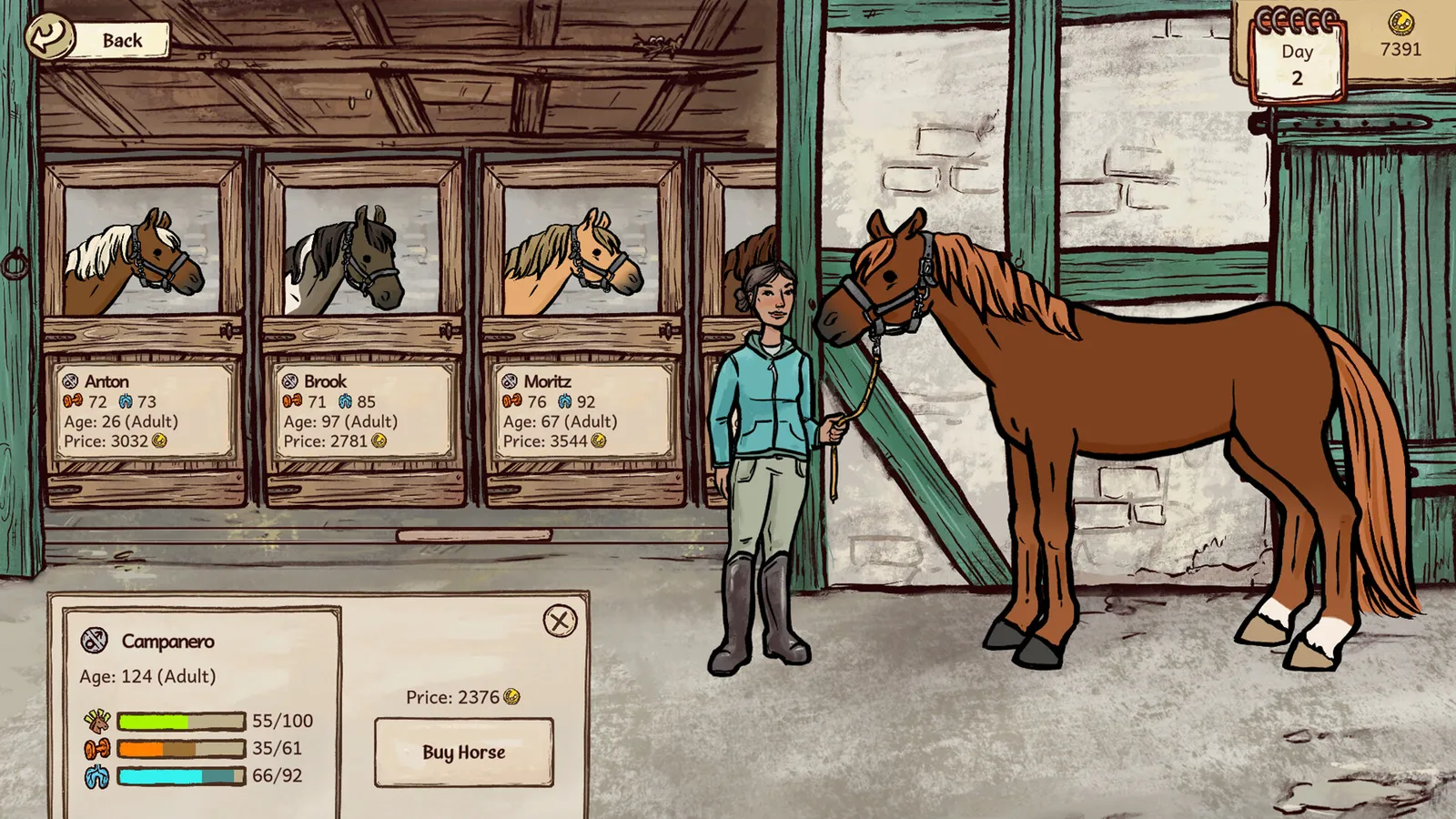
- Rotating stock: The trader displays several adult horses at once with their age, price, current stats, and stat caps. Stock refreshes periodically over in-game days, so do not force a bad purchase if nothing fits your yard.
- Prestige drives quality: Higher farm Prestige increases the odds of seeing horses with stronger stat potential in town. Early saves see modest caps; later saves with steady competition wins and clean care unlock far better prospects.
- Read the dashed/extended potential bar first: Each Strength and Endurance bar shows both the solid trained value and the extended potential cap (for example,
35/61strength and66/92endurance). Training can raise the solid fill, but it can never pass a horse’s natural potential cap. A slightly untrained horse with high potential is a better long-term buy than a maxed-out horse with a low ceiling. - Check age before paying: Hoofprint Bay ages horses by in-game days (rounds), not years. Community testing places senior status around day 180 (when horses can no longer ride, compete, or breed) and retirement around day 192. Buying a horse already past day 120 leaves far fewer productive rounds than a younger adult around day 25–70.
- Hidden traits still apply: Just like starter mares, personality traits are not fully revealed on the shop card—factor potential care quirks into your budget (personality traits guide).
- Fixed prices under v1.0.3+ multipliers: Patch v1.0.3 added custom income and expense multipliers, but the developers explicitly kept horse buy and sell prices fixed so players cannot flip horses for infinite cash. Plan your bankroll through reliable income streams (make money guide).
Max Horses Limit and Town Boarding Storage
A common question from players coming over from Mein Pferdehof—which capped yards at roughly five horses—is how big a Hoofprint Bay stable can get. Your farm scales much higher, and you have two overflow tools when the main barn fills up.
| Storage location | Reported capacity | What it is for | Key rule |
|---|---|---|---|
| Main Farm Stable | 4 starting → ~20 max | Active riding, lesson, boarder, and breeding horses | Upgrade stable tiers for slots; match pasture level so every group keeps turnout. |
| Yearling Paddock | Up to 13 yearlings | Foals and young stock before adulthood | Keeps young horses out of your main stable slots while you breed. |
| Town Boarding Storage | Off-property overflow | Parking extra horses when main stalls are full | Retrieve horses back to your yard whenever you open a stall. |
Community guides and Reddit reports consistently place the fully upgraded main farm cap at about 20 horses across your stable groups—roughly four times Mein Pferdehof’s limit (see our Mein Pferdehof comparison). Filling your expanded yard also ties directly into the FULL_HOUSE Steam achievement (unlocked by 5.8% of Steam players as of November 2026).
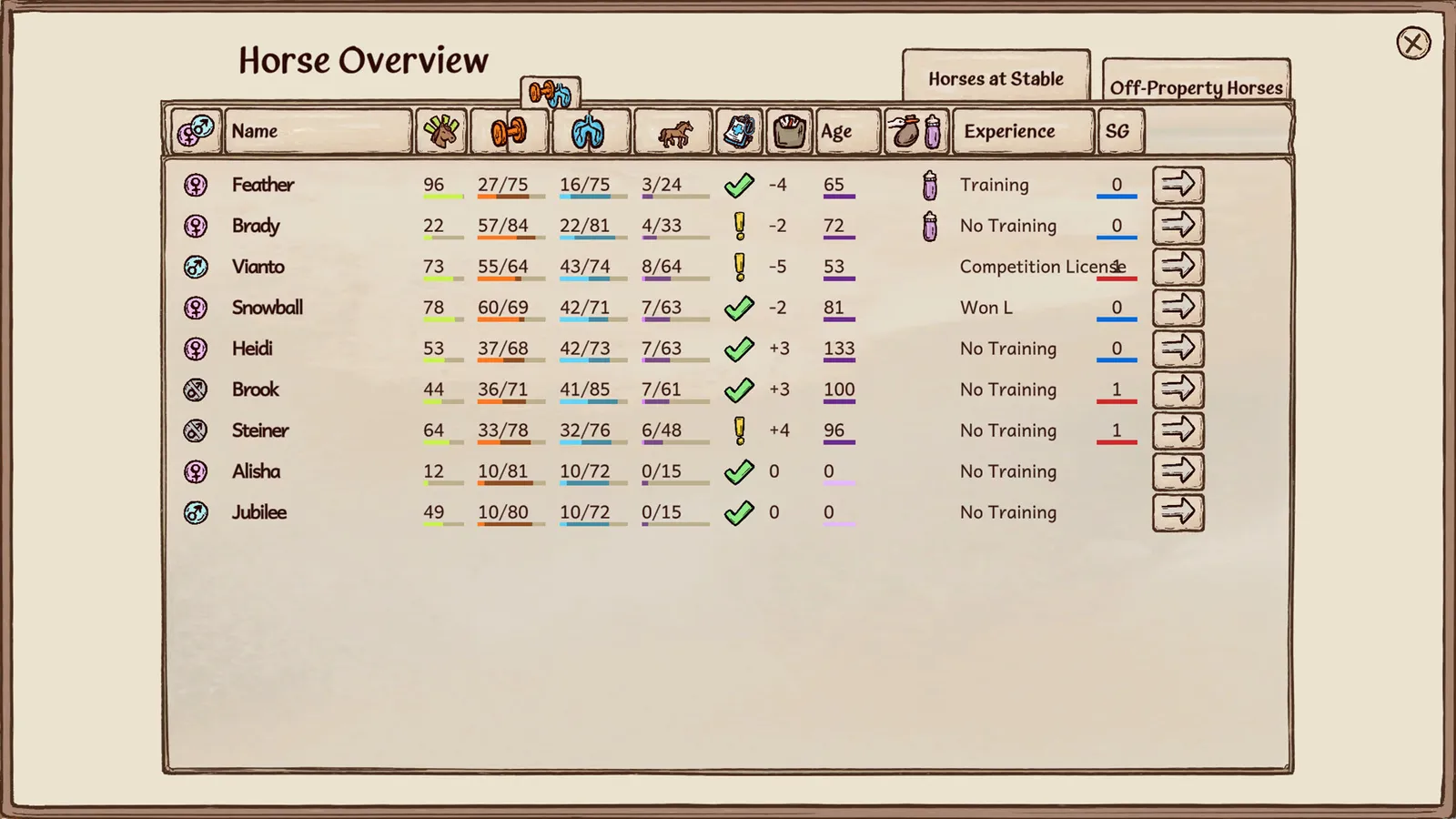
When your main stable hits capacity—whether because a mare just foaled or you spotted a high-potential stud at the Town Trader—you do not have to sell a favorite horse on the spot. You can board extra horses in town to free up stalls on your farm and bring them back later once you upgrade again or sell other stock. In the office Horse Overview, off-property horses are tracked separately from active farm stalls so you can keep tabs on your whole herd.
Screenshot: official Steam store page.
If breeding is what keeps crowding your yard, build and upgrade the Yearling Paddock before rushing late stable tiers (building upgrade order and breeding guide). Remember that every main-stable upgrade raises daily running costs, so expand only when lessons, boarders, and prizes comfortably cover feed and upkeep.
How the Ferry (Port) Works in Hoofprint Bay
Players frequently open the Ferry icon in the top-right corner of Town expecting a rotating horse market or an island travel menu—and find it empty. That is intentional: the Town Ferry (port) is not a regular store.
Instead, the Ferry is Hoofprint Bay’s built-in cross-save transfer system. It lets you move a horse from one save slot to another (for example, carrying a prized homebred line into a fresh save) or share a horse with friends by sending them two local files: a .png image and a matching .json data file.
Step-by-Step: Exporting a Horse via the Ferry
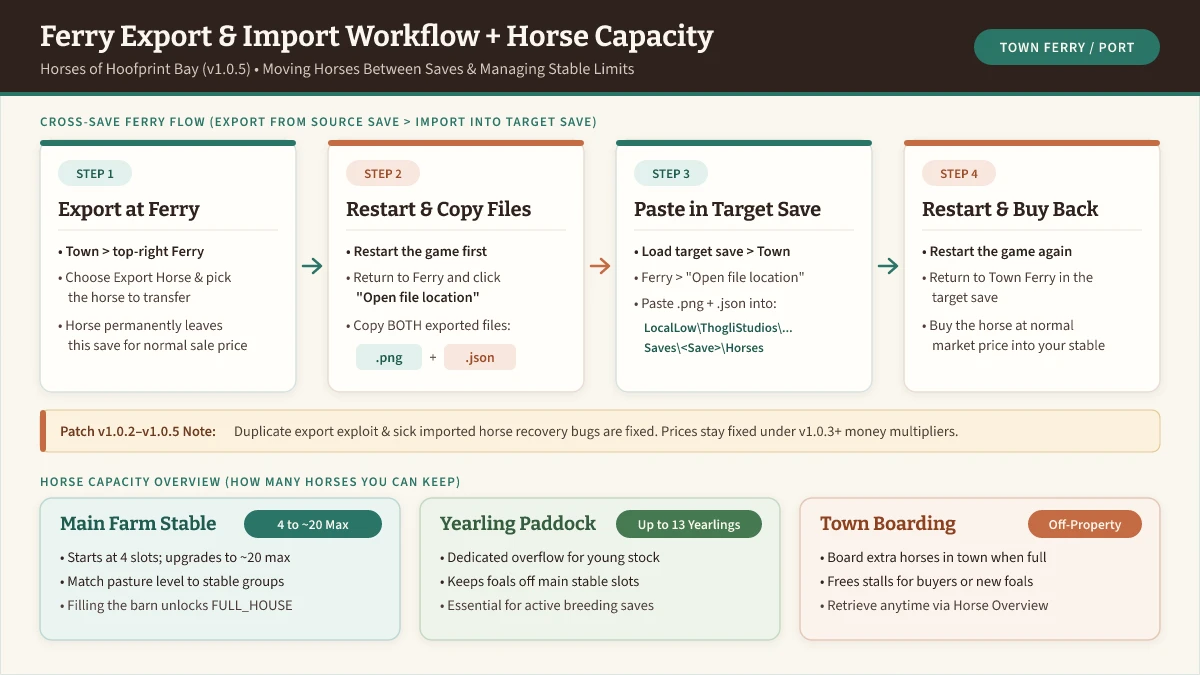
- Load the source save that currently owns the horse you want to move.
- Go to Town and open the Ferry in the top-right corner.
- Choose Export Horse and select the horse you want to send off.
- Confirm the export. The horse is permanently removed from that save, and your account receives its normal in-game sale price.
- Restart the game so the exported files finalize cleanly on disk.
- Return to the Ferry screen and click “Open file location”.
- Copy both generated files for that horse—the
.pngfile and the.jsonfile. Sharing only one of the two will not import properly.
Step-by-Step: Importing a Horse into Another Save
- Load your target save (or send the
.png+.jsonpair to a friend so they can load theirs). - Make sure the target farm has an open stall (or room after boarding another horse in town) and enough money to pay the horse’s normal market price.
- Go to Town → Ferry and click “Open file location”. On Windows, this opens your save’s horse folder inside:
%appdata%\..\LocalLow\ThogliStudios\Horses of Hoofprint Bay\Saves\<YourSave>\Horses - Paste both the
.pngand.jsonfiles into that folder. - Restart the game so the target save scans the new files on startup.
- Re-open Town → Ferry. Your imported horse will now wait in the Ferry stalls—buy it at its normal market price to move it into your stable.
Rescue Horses and Community Ferry Challenges (Base Game vs. Mods)
Because players often search for rescue horses alongside the Ferry and Horse Trader, it is worth stating clearly what is—and is not—in the base game:
- Base game (as of v1.0.5): There is no built-in rescue horse shelter or official rescue-adoption mechanic. Threads on
r/HorsesOfHoofprintBayasking for neglected, injured, low-confidence rescues are feature wishlists rather than an unfound vanilla building. - Community Ferry challenge packs: Creators share custom
.png+.jsonrescue horses (such as the Westmore Rescue Horses series distributed on Patreon and Discord) that you bring into your save using the exact Ferry import workflow above, paired with self-imposed rehab rules. - Nexus Mods option: Players who want automatic rescues in town use the community mod Hoofprint Rescue Horses, described on Nexus Mods as spawning low-fitness, low-confidence, injured horses at roughly a 40% discount in the town market so you can vet-treat and rehabilitate them.
Keep that boundary in mind if you are playing vanilla: the Town Trader sells standard healthy stock, while rescue challenges come from community Ferry files or mods.
Related Guides
- Starter Mare Guide — why all ten opening ferry mares share identical base stats.
- Building Upgrade Order — when to prioritize arena, trailer, stable tiers, and the yearling paddock.
- Breeding Guide — how potential caps, station tiers, and town studs outgrow market horses.
- Make Money Guide — building steady cash for high-potential purchases and Ferry buy-ins.
- Beginner Guide — first-week care loop, licenses, and avoiding early stable bloat.
Sources and verification
Compiled 2026-11-27 from official Steam patch notes (v1.0.2–v1.0.5) via the Steam News API (appid=3727090), official Steam achievement stats (FULL_HOUSE), TMQ Horse Game Database — Horses of Hoofprint Bay, and consistent multi-thread player reports on r/HorsesOfHoofprintBay, r/GamesWithHorses, and Steam Community discussions.
Not verified on this page: exact build costs and construction timers for every late stable tier; whether town boarding has an upper horse count cap or fixed daily fee across all patches; exact in-game day interval between Town Trader stock refreshes.
FAQ
What is the max number of horses in Horses of Hoofprint Bay?
How do you buy more horses in Horses of Hoofprint Bay?
How does the Ferry (Port) work in Hoofprint Bay?
How do you transfer or share a horse with another save or friend?
What happens to my horse when I export it through the Ferry?
Are there rescue horses in Horses of Hoofprint Bay?
Related Articles
Farm
Hay, Pastures & Fields Guide — Horses of Hoofprint Bay
Learn how to buy hay, upgrade pastures and fields to Stage 3, balance grain and oats, manage pasture gates, and sort stable groups in Horses of Hoofprint Bay.
Competitions
Caprilli Guide — Horses of Hoofprint Bay
Caprilli in Horses of Hoofprint Bay: what the test checks, how to unlock and enter, scoring basics, and prep low-stat horses before show jumping.
Competitions
Medium Show Jumping Guide — Horses of Hoofprint Bay
Win Novice (medium) show jumping in Horses of Hoofprint Bay: prep checklist, jump assist limits, strength training, and timing fixes for the post-Beginner wall.
Was this helpful?
Thanks for the feedback!